Linear Implementation Analysis: Bridging Development and Project Management Needs
Table of Contents
1. Linear's Core Capabilities: Building Blocks
2. Current vs. Proposed Analysis
3. Needs Analysis: Dev vs. Non-Dev
4. Container Philosophy: Organization vs. Work
5. Proposed Solution: Unified Task Model with Container Distinction
6. That Sounds Like a Lot of Changes, But What Actually Changes?
Linear's Core Capabilities: Building Blocks
Understanding what Linear offers us as a platform and how it differs from traditional project management tools
Linear's Native Mental Model:
Element | Purpose | Scope | Best Use |
|---|---|---|---|
Issue/Task | Atomic unit of assignable work | Single person, clear completion criteria | All work items regardless of size |
Project | Container for related work | Product/feature boundary | Organizational separation |
Initiative | Strategic grouping across projects | Business objective | High-level goal alignment |
Milestone | Time-based checkpoint | Project timeline | Release/phase planning |
Label/Tag | Flexible categorization | Cross-cutting concerns | Minimal, purposeful grouping |
Relations | Dependencies between issues | Workflow coordination | Technical dependencies |
Traditional Agile Mental Model:
Element | Purpose | Scope | PM Expectation |
|---|---|---|---|
Epic | Large feature spanning sprints | Multiple stories | Portfolio planning |
User Story | User-focused requirement | Business value unit | Requirements documentation |
Task | Technical implementation | Story breakdown | Developer assignment |
Subtask | Granular work items | Task decomposition | Progress tracking |
Current vs. Proposed Analysis
Current System Issues:
Single Project + Tag Explosion
├── Strategy Partner (tag)
├── Territory Generator (tag)
├── Engineering (tag)
├── Design (tag)
├── Epic (tag)
├── User Story (tag)
├── Ready for Dev (tag)
└── [Cognitive Overload]
Problems:
Tags doing heavy lifting that projects should handle
Role tags duplicating assignee information
Artificial categorization slowing task creation
User stories creating lingering subtask dependencies
Proposed System Analysis:
Initiative: Lilly Workbench
├── 9Box Project
│   ├── Definition Milestone → Research Spikes
│   ├── POC Milestone → Research Spikes
│   ├── Beta Milestone → User Stories & Epics
│   └── v1 Milestone → User Stories & Epics
├── Journey Project (same structure)
└── Shared Capabilities Project
Improvements:
✅ Proper project separation
✅ Linear documentation integration
✅ Milestone-based timeline
Remaining Issues:
❌ User story/epic complexity returns in later phases
❌ Role tags still present on subtasks
❌ Shared project creates cross-dependencies
❌ Subtask patterns likely to create lingering work
Needs Analysis: Dev vs. Non-Dev
Development Team Needs:
Need | Why Critical | Linear Solution |
|---|---|---|
Clear task ownership | Fast-moving team, accountability | Assignee field |
Minimal categorization | Reduce decision fatigue | Built-in priority/status |
Direct dependencies | Technical coordination | Issue relations |
Contextual information | Just enough to execute | Task description |
Progress visibility | Stakeholder/Team communication | Milestone progress views |
Feature grouping | Roadmap planning | Project organization + milestones |
Design/Product Needs:
Need | Why Critical | Potential Solution |
|---|---|---|
User context | Feature alignment with user value | Task descriptions with user context |
Progress visibility | Stakeholder/Team communication | Milestone progress views |
Feature grouping | Roadmap planning | Project organization + milestones |
Documentation | Design handoffs, requirements | Linear docs + task descriptions |
Strategic alignment | Business value tracking | Initiatives |
Why Both Needs Are Valid:
Design needs user context to create coherent experiences
Development needs technical clarity to execute efficiently
Project management needs visibility for stakeholder management
Teams need coordination without bottlenecks
Container Philosophy: Organization vs. Work
Understanding the fundamental distinction between structures that organize and structures that execute
The Core Insight
"The key distinction we need to make is between organizational/project work and day-to-day work execution. These serve very different roles and have separate needs at separate times. Organization acts as the backbone of everything we do—it stays consistent and provides structure. Work, on the other hand, comes and goes and needs to be dealt with quickly. If Linear is to serve us and enable us to do our work better, we need containers that support this fundamental distinction."
The 80/20 Principle
"When work needs to be done—which is 80% of the time—we need to immediately get into what we're doing. When organization needs to happen—which isn't an everyday or all-the-time task—we need these structures in place to keep us organized. That's the other 20%."
Container Types
Container Type | Purpose | Lifespan | Primary Users | Update Frequency | Linear Implementation |
|---|---|---|---|---|---|
Organizational Containers | Strategic visibility, grouping, macro tracking | Long-lived (months/quarters) | PM, Stakeholders, Leadership | Weekly/bi-weekly | Linear tasks with |
Work Containers | Immediate execution, task ownership, daily progress | Short-lived (days/weeks) | Developers, Designers, Individual Contributors | Daily/hourly | Standard Linear tasks |
Organizational Containers (The Backbone)
Linear Implementation: Tasks tagged with epic and user-story for easy identification and filtering.
Structure Capability:
Epic Task [epic]: "User Authentication System"
├── User Story Task [user-story]: "User can log in with email/password"
├── User Story Task [user-story]: "User can log in with OAuth providers"
└── User Story Task [user-story]: "User can reset forgotten password"
Characteristics:
✅ Live as Linear tasks with organizational tags
✅ Can have nested parent/child relationships for planning
✅ Filterable via
epicanduser-storytags✅ Provide macro-level progress visibility for stakeholders
✅ Enable roadmap and strategic communication
✅ Stable over time - persist across multiple sprint cycles
❌ Should NOT be used for daily execution work
❌ Should NOT have completion dependencies on work container tasks
Lifecycle:
Created during planning sessions and roadmap discussions
Updated during sprint ceremonies for stakeholder communication
Use Linear's native parent/child relationships for epic → user story hierarchy
Closed when business/user outcome is achieved
Work Containers (The Execution)
Linear Implementation: Standard Linear tasks without organizational tags.
Examples:
Tasks: "Implement OAuth callback handler"
Tasks: "Design login form validation states"
Tasks: "Update user session middleware"
Tasks: "Fix Safari rendering bug" [emergent]
Characteristics:
✅ Standard Linear tasks optimized for execution
✅ Reference organizational containers via description template
✅ Immediately actionable with clear completion criteria
✅ Single owner responsibility and accountability
✅ Can emerge during execution as work is discovered
✅ Ephemeral - live for sprint duration, then closed
❌ Should NOT be tagged as organizational containers
❌ Should NOT be forced into parent/child relationships with organizational containers
Loose Coupling Strategy: Template-Based Reference
Work containers reference organizational containers through enhanced task description templates that include both Epic and User Story context.
Enhanced Task Template Structure:
Epic: [Epic Ticket reference with @TICKET-ID, e.g. @LLY-182]
User Story: [User Story Ticket reference]

[Actual task description and technical details]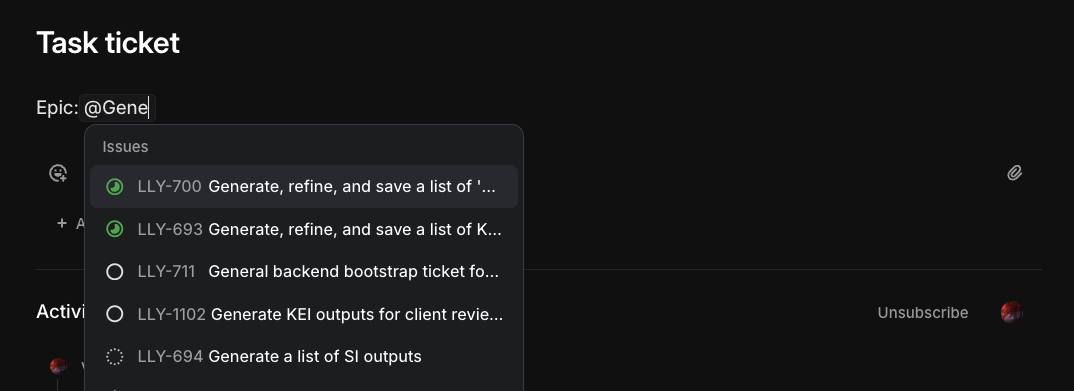
Example Implementation:
Title: "Implement OAuth callback handler"

Epic: User Authentication System

User Story: User can log in with OAuth providers

Technical Implementation:
- Add OAuth callback route to auth service
- Validate state parameter for CSRF protection
- Extract user data and create/update user record
- Generate JWT token for session management

Acceptance Criteria:
- Callback handles Google and GitHub OAuth flows
- Invalid state parameters return 400 error
- User data properly mapped to internal user model
Benefits of This Hybrid Approach:
Organizational Advantages:
✅ Easy filtering - Click
epictag to see all epics,user-storytag for all stories✅ Native Linear hierarchy - Epic tasks can have User Story children
✅ Unified system - Everything lives in Linear, no external documentation
✅ Linear's backlink feature - Opening epic/story shows all referencing work tasks
Work Container Advantages:
✅ Enhanced context - Work tasks reference both epic and user story
✅ No systematic coupling - Work tasks aren't children of organizational containers
✅ Execution focus - Work tasks remain optimized for daily workflow
✅ Search-based discovery - Find related work via "Epic: [Name]" search
The Verbosity Tradeoff
Adding more verbosity to the definitions of the actual work tickets.
What We Gain:
Complete traceability from work → user story → epic
Rich context for developers and designers during execution
Clear business justification visible in every work item
Better handoff communication between disciplines
What We Accept:
Slightly longer task descriptions
Need to include both epic and user story references
More upfront context gathering during task creation
Proposed Solution: Unified Task Model with Container Distinction
Project Structure:
Initiative Level:
Initiative: Lilly Workbench (Strategic alignment)
├── 9Box (Product boundary)
└── Journey (Product boundary)
Organizational Container Structure:
Epic and User Story Tasks in Linear:
9Box Project:
├── Epic Task [epic]: "User Management System"
│   ├── User Story [user-story]: "Admin can assign roles to team members"
│   ├── User Story [user-story]: "User can update their profile settings"
│   └── User Story [user-story]: "User can view their access permissions"
│
├── Epic Task [epic]: "Data Visualization Engine"
│   ├── User Story [user-story]: "User can create custom charts"
│   ├── User Story [user-story]: "User can export visualization data"
│   └── User Story [user-story]: "User can share charts with team"
│
└── Epic Task [epic]: "Performance Analytics"
    ├── User Story [user-story]: "User can view page load metrics"
    └── User Story [user-story]: "User can track feature usage"
Work Container Structure:
Standard Linear Tasks with Enhanced Context:
9Box Project → Q3 Feature Development Milestone:

├── "Implement role assignment API endpoint"
│   Epic: User Management System @LLY-189
│   User Story: Admin can assign roles to team members
│
├── "Design role management interface"
│   Epic: User Management System  @LLY-189
│   User Story: Admin can assign roles to team members
│
├── "Create chart rendering engine"
│   Epic: Data Visualization Engine @LLY-190
│   User Story: User can create custom charts
│
├── "Optimize database queries for charts" [emergent]
│   Epic: Data Visualization Engine @LLY-190
│   User Story: User can create custom charts
│   Note: Discovered during performance testing
│
└── "Fix Safari rendering bug" [emergent]
    Epic: Data Visualization Engine @LLY-190
    User Story: User can create custom charts
    Note: Discovered during cross-browser testing
Enhanced Task Template:
Complete Template Structure:
Epic: [Epic Name]
User Story: [User Story Name]

## Context
[Brief description of why this work is needed and how it fits the user story]

## Implementation Details
[Technical specifics, approach, considerations]

## Acceptance Criteria
- [ ] Specific, testable outcomes
- [ ] User story acceptance criteria addressed
- [ ] Edge cases handled
- [ ] Tests written/updated
Applied Example to a ticket’s description:
Title: "Implement role assignment API endpoint"
Epic: User Management System
User Story: Admin can assign roles to team members

## Context

Need API endpoint for the admin interface to assign roles (Admin, Manager, Member) to team members. This supports the user story requirement that admins can control team member permissions.

## Implementation Details
- Create PUT /api/users/:id/role endpoint
- Validate requester has admin role
- Validate target role is valid enum value
- Update user record with new role
- Return updated user object
- Add audit logging for role changes

## Acceptance Criteria
- [ ] Only admin users can assign roles
- [ ] Invalid roles return 400 with clear error
- [ ] Role changes are logged with timestamp and admin ID
- [ ] Updated user object returned in response
- [ ] Unit and integration tests cover happy path and error cases
- [ ] Frontend can successfully call endpoint and handle responses
Container Interaction Rules:
For Organizational Containers:
Epic tasks tagged with
epic- easily filterable and identifiableUser Story tasks tagged with
user-story- can be children of epicsCreated during planning sessions - roadmap and strategy discussions
Use Linear's native parent/child relationships - Epic → User Stories
Updated during ceremonies - sprint reviews, stakeholder updates
Progress tracked through milestone completion - not individual work task dependencies
For Work Containers:
Standard Linear tasks - no organizational tags
Reference Epic AND User Story in description template
Created on-demand during execution - as work is discovered
Single assignee ownership - clear accountability
Closed within sprint cycles - ephemeral by design
Enhanced context through epic/story references improves handoffs and decision-making
Discovery and Connection:
Filter organizational containers - Use
epicanduser-storytag filtersLinear backlinks - Opening epic/story shows all referencing work tasks
Search-based filtering - "Epic: User Management" finds all related work
Enhanced traceability - Every work task clearly connected to business value
Native Linear hierarchy - Epics can contain User Stories as children
That Sounds Like a Lot of Changes, But What Actually Changes?
What We Acknowledge
We acknowledged that our team has two distinct needs that require different approaches.
The value of structure
Epics and user stories give us macro perspective on complicated projects and help us understand how features are tracking. We're keeping them because they genuinely help with visibility and stakeholder communication.
The execution reality
User stories explain how a product should function from a user's perspective, but that rarely aligns with the actual development work that needs to be done. The scope of a user story differs between design tasks and development tasks, and forcing our work into those structures creates friction.
Our workflow patterns
80% of the time we're heads-down executing work and need immediate access to what we're doing. 20% of the time we're organizing, planning, and communicating with stakeholders. Both needs are valid and deserve optimized solutions.
Container Philosophy: The Core Change
The biggest conceptual shift is recognizing that we have two types of containers serving different purposes.
A mental modal to keep description needs separate.
Organizational Containers (The Backbone)
Epics and user stories that provide strategic visibility and stakeholder communication. These are stable, long-lived, and optimized for planning discussions.
Work Containers (The Execution)
Individual tasks optimized for daily execution. These are ephemeral, emerge during work, and get closed within sprint cycles.
The key insight: These containers can reference each other without being systematically coupled. Work tasks mention their related epic and user story, but aren't locked into hierarchical dependencies.
What Stays Exactly the Same
Almost everything about our daily workflow remains unchanged.
For everyone:
Linear projects, milestones, and initiative structure
Sprint ceremonies and planning processes
Individual task assignment and ownership
Progress tracking through task completion
Project boundaries (9Box vs Journey)
For organizational containers (epics/user stories):
Can still have subtasks and nested structures
Can still use parent/child relationships
Still serve the same planning and communication purposes
Still updated during ceremonies and stakeholder discussions
What's Different: Organizational Containers
Minimal changes - we're just being more explicit about the purpose of tasks.
New requirements:
Tag epics with
epicfor easy filteringTag user stories with
user-storyfor easy filteringAcknowledge these are for planning/visibility, not daily execution
Everything else stays the same:
Can have subtasks, children, nested structures
Updated during planning sessions and ceremonies
Used for stakeholder communication and roadmap visibility
Closed when business/user outcomes are achieved
What's Different: Work Containers
This is where the meaningful changes happen, focused on better context and simpler execution.
New requirements:
Enhanced task descriptions: Every work task includes which epic and user story it relates to using a simple template
Single assignee rule: One person owns each task (no role tags needed)
Minimal tagging: Only add tags when actually needed for filtering (like
research-spike,bug, orcritical-pathThat worked great and we loved it!)
New capabilities:
Tasks can emerge organically: Create work as you discover it without restructuring organizational containers
Cross-reference via descriptions: Tasks mention epics/stories but aren't locked into hierarchies
Template-supported context: Consistent format ensures better handoffs and decision-making
What this means day-to-day:
Slightly longer task descriptions with more context
No more guessing why you're doing something or how it fits the bigger picture
No more role tags or category explosion
Work can emerge and get resolved quickly without organizational overhead
Example of what changes:
Before: "Implement OAuth callback" (minimal context)

After: "Implement OAuth callback handler"
Epic: User Authentication System
User Story: User can log in with OAuth providers
[Implementation details and acceptance criteria]
The result: Better context when you need it (in work tasks) and cleaner organization when you need that (through tagged epics and stories), without the two getting in each other's way.
A visual comparison
Before:
graph TB
    E1[Epic: User Authentication System]
    US1[User Story: OAuth Login]
    US2[User Story: Password Reset]
    T1[Task: Design login UI]
    T2[Task: Implement OAuth callback]
    T3[Task: Add error handling]
    T4[Task: Design reset flow]
    T5[Task: Implement reset logic]

    E1 --> US1
    E1 --> US2
    US1 --> T1
    US1 --> T2
    US1 --> T3
    US2 --> T4
    US2 --> T5

    classDef epic fill:#4fc3f7,stroke:#ffffff,stroke-width:3px,color:#000000
    classDef userStory fill:#ba68c8,stroke:#ffffff,stroke-width:3px,color:#000000
    classDef task fill:#81c784,stroke:#ffffff,stroke-width:3px,color:#000000

    class E1 epic
    class US1,US2 userStory
    class T1,T2,T3,T4,T5 task
After:
Note: Work tasks are created with a template that includes Epic and User Story references in the description, providing context without hierarchical dependencies.
graph TB
    subgraph "Organizational Containers"
        E2[Epic: User Authentication System<br/>#epic]
        US3[User Story: OAuth Login<br/>#user-story]
        US4[User Story: Password Reset<br/>#user-story]

        E2 -.-> US3
        E2 -.-> US4
    end

    subgraph "Work Containers"
        W1[Implement OAuth callback<br/>Epic: User Authentication<br/>User Story: OAuth Login]
        W2[Design login error states<br/>Epic: User Authentication<br/>User Story: OAuth Login]
        W3[Refactor auth middleware ⚡<br/>Epic: User Authentication<br/>User Story: OAuth Login<br/>Note: Emergent work]
        W4[Design reset flow<br/>Epic: User Authentication<br/>User Story: Password Reset]
    end

    classDef epic fill:#4fc3f7,stroke:#ffffff,stroke-width:3px,color:#000000
    classDef userStory fill:#ba68c8,stroke:#ffffff,stroke-width:3px,color:#000000
    classDef workTask fill:#ffb74d,stroke:#ffffff,stroke-width:3px,color:#000000
    classDef emergent fill:#f06292,stroke:#ffffff,stroke-width:3px,color:#000000

    class E2 epic
    class US3,US4 userStory
    class W1,W2,W4 workTask
    class W3 emergent